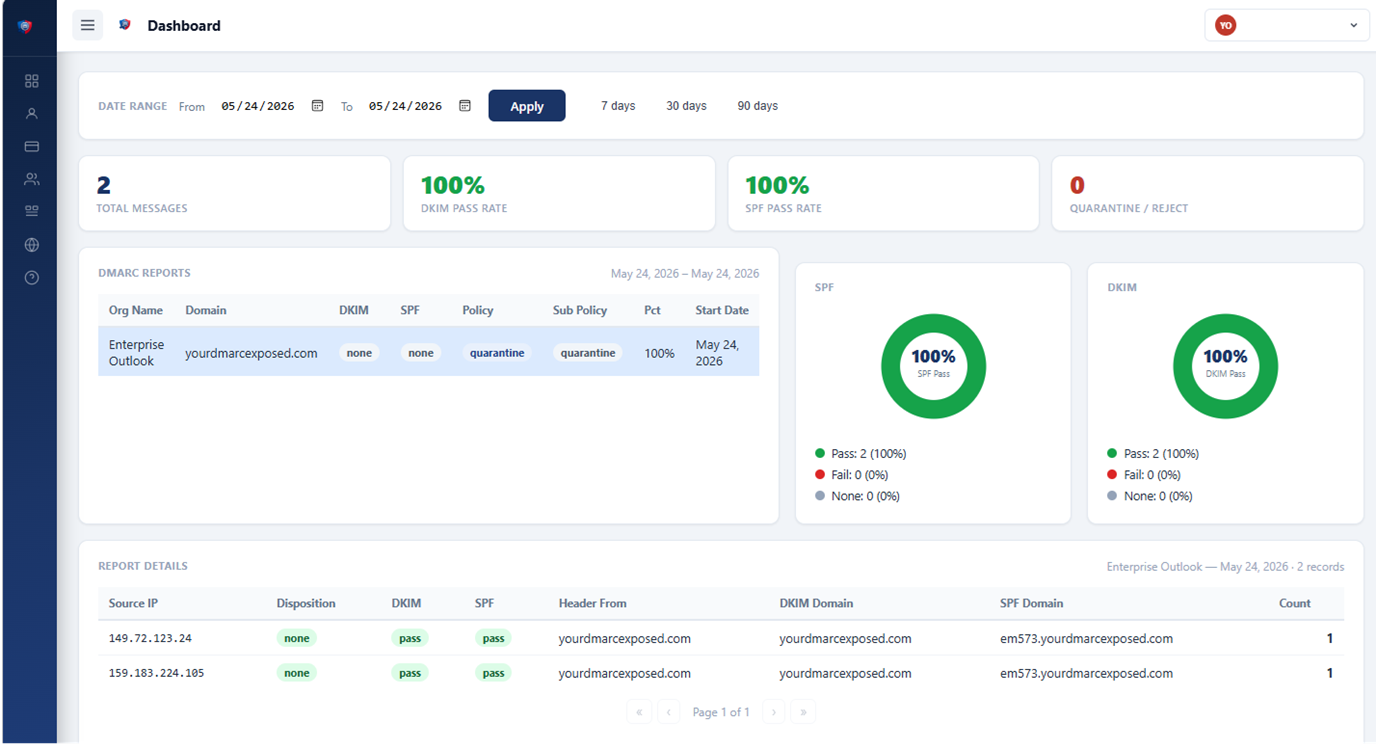
Interactive Dashboard
Visualise DMARC report data across all sending sources. See pass and fail counts, sending IPs, and authentication results at a glance.

Your DMARC Exposed collects, analyses, and visualises the DMARC aggregate reports that mail servers send for your domain — giving your team instant visibility into every email sent in your name.
No credit card required · Free trial included · Cancel any time
DMARC (Domain-based Message Authentication, Reporting, and Conformance) is an email authentication protocol that lets domain owners specify how receiving mail servers should handle messages that fail SPF or DKIM checks — and receive daily aggregate reports of authentication results. It is the primary standard used to detect and prevent email spoofing and phishing attacks that impersonate a domain.
How DMARC works →A DMARC aggregate report is an XML file sent daily by receiving mail servers (Google, Microsoft, Yahoo, and hundreds of others) to the address in your DMARC DNS record. Each report shows which servers sent email claiming to be from your domain, and whether those messages passed SPF and DKIM authentication. Your DMARC Exposed collects and parses these reports automatically.
Full DMARC glossary →Receives DMARC reports from all major mail providers
Without visibility into your DMARC reports, you're flying blind. Attackers can send thousands of spoofed emails using your domain — and you'll never know until customers complain.
Every major mail provider — Google, Microsoft, Yahoo, Apple, Comcast — sends XML aggregate reports to the address in your DMARC record. These reports reveal exactly which servers send email claiming to be from your domain, and whether those messages passed SPF and DKIM authentication.
Most organisations publish a DMARC record and then never read the reports. The XML files are dense, technical, and arrive as gzip attachments. Without a tool to parse and visualise them, the data is practically useless.
The result? SPF misconfigurations go unnoticed for months. Attackers spoof your domain in phishing campaigns. Third-party senders fail authentication silently, and legitimate email lands in spam.
Learn how DMARC, SPF & DKIM work together →Turn raw XML aggregate reports into actionable intelligence — without needing to be a DNS expert.
Visualise DMARC report data across all sending sources. See pass and fail counts, sending IPs, and authentication results at a glance.
Receive a nightly digest of DMARC failures for your domain. Your IT team is alerted the moment something goes wrong — before your users notice.
Instantly see when attackers attempt to send email using your domain. Identify the source IP, sending organisation, and message volume.
Prove domain ownership with a simple TXT record. Our automated checker confirms your DMARC record is configured correctly.
Add multiple users with granular permissions. Developers, IT administrators, and security teams each see exactly what they need.
Start with a free trial, upgrade to a monthly plan that fits your needs. No long-term contracts, cancel any time.
View plans →There are several DMARC monitoring tools on the market. Here's what makes ours different.
Purchase directly through the Azure Marketplace and apply the cost against your existing Microsoft Azure commitment. No separate vendor contract, no separate billing — it rolls up with your Azure invoice.
View plans →SPF, DKIM, and DMARC failures can be hard to diagnose. Your DMARC Exposed includes a built-in AI that explains any DNS record or failure report in plain English — so your team understands the problem, not just that a problem exists.
How DMARC works →No need to log in every day. Your IT team gets a nightly email digest of DMARC failures — so problems are caught before your users notice. Most competitors offer alerting only on paid enterprise tiers.
See how we compare →No annual contracts, no calls with sales, no per-seat pricing. Choose a plan, start your free trial, and upgrade when you're ready. Cancel any time from your dashboard.
View pricing →Your DMARC Exposed uses AI in the places where it genuinely helps — cutting through technical complexity so you get clear answers faster.
SPF, DKIM, and DMARC DNS records are dense and easy to misconfigure. Ask the built-in AI to explain any record in plain English — what each tag means, whether your current configuration looks correct, and what to change if it doesn't.
When an email fails DMARC authentication, understanding why isn't always straightforward. The AI reviews the failed report data and gives you a plain-English diagnosis — identifying the likely cause and suggesting what to investigate or fix.
No complex integration. No consultant required.
Register your domain and select a plan. The free trial requires no credit card.
Add the verification TXT record to your DNS. Then update your DMARC record to include our reporting address.
Within 24 hours, aggregate reports start flowing in. Use the dashboard or nightly alerts to stay on top of your email security.
"Using Your DMARC Exposed we were able to quickly and easily identify that we had a SPF configuration issue that needed to be resolved."
"We got a nightly email sent to our IT team allowing us to quickly identify when email servers were having problems getting email from us so we could respond before our users knew."
"Your DMARC Exposed showed us when our users were having SPAM sent under their email addresses allowing us to respond quickly to any potential corporate image issues."
DMARC (Domain-based Message Authentication, Reporting, and Conformance) is an email authentication protocol. When you publish a DMARC record, mail providers send aggregate reports to your specified address. Your DMARC Exposed parses and visualises those reports so you can act on them — without needing to be an XML or DNS expert.
SPF lists the mail servers authorised to send email for your domain. DKIM adds a cryptographic signature so receivers can verify messages haven't been altered. DMARC ties both together, defines a policy for failing messages, and requests aggregate reports. Learn more →
Account creation takes under five minutes. Add the DNS verification record we give you, and DMARC reports typically start arriving within 24 hours from Google, Microsoft, Yahoo, and other major providers.
Free trial available — no credit card required.